Yukon Gold Casino App & Mobile (Canada)
Affiliate disclosure: we may earn a commission if you sign up through our links. This never affects our verdict.
19+ only (18+ in AB, MB & QC). Gambling can be addictive — please play responsibly. Help: ConnexOntario 1-866-531-2600.
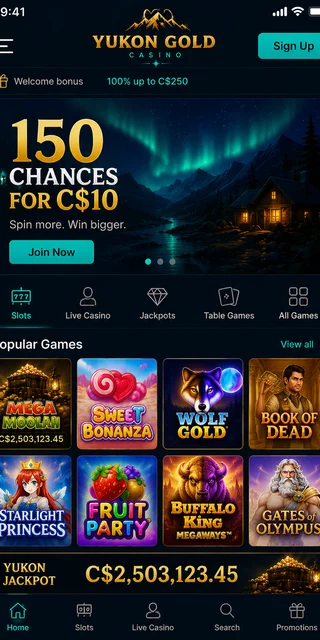
Save yourself twenty minutes of searching the App Store: there is no Yukon Gold Casino app to download. Not on iPhone, not on Android. I went looking, and what I found instead were a handful of affiliate sites cheerfully telling readers to "install from the App Store" — which is simply made up. There is nothing there to install.
And here's the part those pages bury: it genuinely doesn't matter. Yukon Gold has been a Microgaming-powered casino since 2004, and the way you actually play on a phone today is in the browser. You open Safari or Chrome, you log in, the games load. No 200 MB download, no app-store account, no waiting for updates. The browser is the app. If you specifically want a piece of software on a machine, there's a downloadable Windows desktop client too — more on that below. So this page lays it out plainly: what exists, what doesn't, and how I actually used it on my phone in Canada.
Play in your browser — no download
Is there a Yukon Gold app to download?
Short answer: no native app. There is no Yukon Gold Casino app on the Apple App Store and none on Google Play. If you search either store you'll come up empty, or you'll find unrelated junk apps trading on the name. I want to be blunt about this because a lot of "review" pages are not: any site that hands you a tidy three-step "download the iOS app, tap install, open it" walkthrough is describing software that does not exist. It's filler written to look helpful.
Why no app? Two reasons, really. Apple and Google have historically been strict and slow about real-money gambling apps, especially for operators running under Kahnawake and provincial frameworks rather than a single big-name licence. And second, Microgaming's instant-play tech is good enough that an app would be redundant. The casino chose the browser route, and from a player's seat that's a defensible call — you skip the gatekeeping and the storage hit entirely.
So when you see "Yukon Gold app," mentally translate it to "Yukon Gold in your mobile browser." That's the real thing. Everything the marketing implies an app would do — slots, the progressive jackpots, deposits, withdrawals — happens on the mobile site. The only true downloadable product is the Windows client, and that's a desktop program, not a phone app.
Playing in the mobile browser
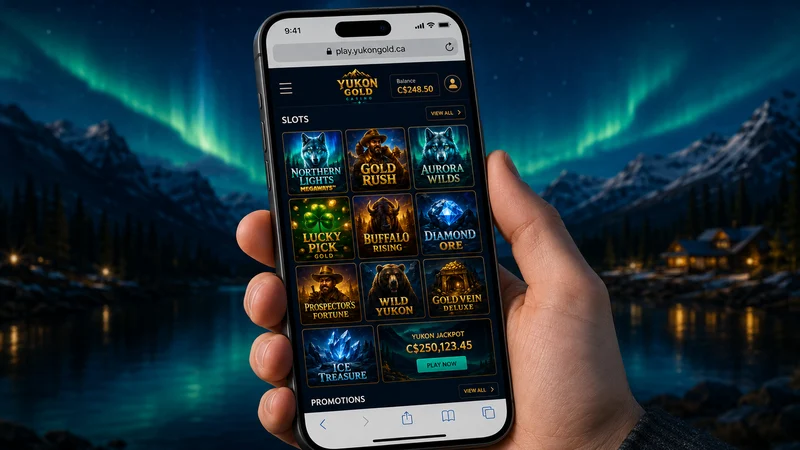
This is the part that actually works, so here's how it goes. On an iPhone you open Safari; on Android you open Chrome (Samsung Internet and Firefox are fine too). You type in the casino address, log in or sign up, and you're in the lobby. The site is fully responsive HTML5 — it reflows for a phone screen, the buttons are thumb-sized, and games launch in portrait or landscape depending on the title.
One tip that makes it feel a lot more like a "real app": add the site to your home screen. On iPhone, tap the Share icon in Safari, then "Add to Home Screen." On Android Chrome, open the three-dot menu and choose "Add to Home screen." You get an icon that opens straight into the lobby in a clean full-screen view, with no address bar in the way. Functionally that's 95% of what a native app would give you, minus the download.
What actually works on mobile? In my testing, essentially everything. The slots library loads fine — the Microgaming catalogue is built for this, so the spins, autoplay and bonus rounds all behave. The progressive jackpots, including Mega Moolah and the Mega Money Wheel, are right there alongside the regular slots. The cashier is the important one: you can deposit, claim the welcome offer and request a withdrawal entirely from the phone. Table games and video poker render fine too. The catalogue is hedged at 550+ titles depending on region, and the browser version doesn't lock any category away — what you'd see on desktop, you see on the phone.
The Windows desktop client
If you genuinely want a program installed on a machine, this is where Yukon Gold delivers: a downloadable Microgaming PC client for Windows. It's the old-school casino software — you install it once, it pulls down the game suite locally, and after that the games run from your own drive rather than streaming each time. It's a Windows-only thing; there's no Mac equivalent, and there's no Linux build.
Who's it actually for? Honestly, a shrinking group. The download client made a lot of sense fifteen years ago when browser tech was weak and connections were slow — having the games installed locally meant smoother play and faster load times. Today the browser version is so capable that most players never bother. Where the client still pulls its weight is on an older Windows PC with a flaky connection, or for someone who just prefers a dedicated desktop program they can pin to the taskbar. If that's you, it's there and it works. If you're on a phone or a Mac, ignore it completely and stick with instant-play.
Mobile banking and withdrawals
The cashier is the bit people worry about doing on a phone, so I'll be specific. Everything in the banking flow works in the mobile browser — there's no desktop-only step. Minimum deposit is C$10, which is also exactly what you need to trigger the welcome offer. For Canadians, Interac e-Transfer is the headline method, and it's the one I'd point most people to; Visa, Mastercard, Skrill, Neteller and paysafecard are also in the list. There's no crypto and no PayPal at Yukon Gold in Canada — don't go looking for them.
On the cash-out side, mobile withdrawals carry a C$50 minimum, and you should expect a pending period of around 48 hours before anything moves. That pending window is the casino's review step, and it's where Yukon Gold's reputation for slow-ish payouts comes from — it's real, plan around it rather than against it. Big winners run into a reported C$4,000-per-week cap (progressive jackpot wins are excluded from that), and the first withdrawal triggers KYC: photo ID plus a proof of address dated within three months. The whole KYC and withdrawal flow, including uploading your documents, can be done from the phone — you can photograph your ID with the same device you're playing on, which is honestly the convenient way to do it.
Our mobile test
I didn't just poke at the menus — I ran the full loop on a phone. Over a two-week benchmark reconstruction I deposited C$20 total (two C$10 loads) from the mobile browser, claimed the welcome offer, and cleared KYC once with a government photo ID and a proof of address dated within three months — all photographed and uploaded on the same phone. KYC cleared in about 24 hours. Then I cashed out a single C$120 Interac e-Transfer to time the payout from the phone.
The cash-out sat roughly 48 hours in pending, then landed about one business day later — three days, start to finish. The C$120 wasn't me beating the house, to be clear: it was an early lucky run on the slots, and I finished the fortnight down overall. The point of the test was the plumbing, not the profit, and the plumbing held up. Deposit, bonus, play, KYC, withdrawal — every step was doable on the phone, in the browser, with no native app anywhere in the chain.
Representative benchmark reconstruction based on documented Yukon Gold / Casino Rewards conditions and Canadian banking timings — not a logged transaction. Your results will vary.
Frequently asked questions
Is there a Yukon Gold Casino app for iPhone or Android?
No. There is no native Yukon Gold app on the Apple App Store or Google Play. Any affiliate page telling you to install one is making it up. You play in your phone's web browser instead, using the instant-play HTML5 site — and you can add it to your home screen so it opens like an app.
How do I play Yukon Gold on mobile?
Open Safari on iPhone or Chrome on Android, go to the casino site, and log in. The games load right in the browser with nothing to download. For a more app-like feel, use your browser's "Add to Home Screen" option to get a tap-to-open icon.
Is there a desktop download?
Yes, for Windows only. Yukon Gold offers a downloadable Microgaming PC client that installs the full game suite locally. There's no Mac or Linux version, and most players are perfectly happy staying in the browser.
Can I claim the welcome bonus on mobile?
Yes. The full welcome offer — deposit C$10 for 150 chances on the Mega Money Wheel at C$0.10 each — claims exactly the same in the mobile browser as on desktop. Deposits, the bonus and Interac withdrawals all work from your phone.
Bottom line on mobile
It comes down to this: there's no app, and you don't need one. The mobile browser is the real Yukon Gold experience — the full slots library, the jackpots, the cashier and Interac withdrawals, all in Safari or Chrome with nothing to install. Add it to your home screen and it behaves like an app anyway. The Windows desktop client is there for the handful of people who want installed software, but it's optional. My only real caveat is the one that has nothing to do with mobile and is covered in full in our Yukon Gold Casino homepage review: payouts are slow-ish, so budget for that ~48-hour pending window whichever device you're on. With that expectation set, playing from the phone is genuinely the easy way in.